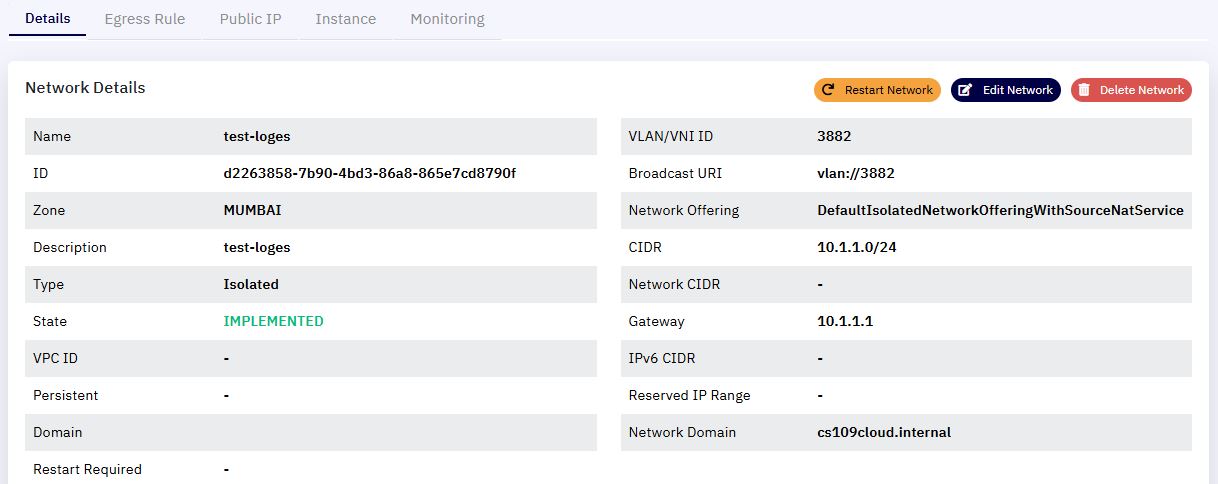
Isolated Network Details
The Isolated Network Details section allows users to view and manage configurations specific to an isolated network. This document provides a comprehensive overview of the information available on this screen and its functional controls.
An Isolated Network provides a dedicated Layer 3 network environment for a user's virtual machines (VMs), with traffic routed through virtual routers. This setup ensures secure and segmented communication, ideal for multi-tier applications.
Network Details Breakdown
| S. No | Field | Description |
|---|---|---|
| 1 | Name | The user-defined name of the network. |
| 2 | ID | Unique identifier automatically assigned to the network instance. |
| 3 | Zone | The geographical datacenter (e.g., MUMBAI) where the network is provisioned. |
| 4 | Description | Additional notes or identifier input by the user. |
| 5 | Type | Indicates the network mode (Isolated). |
| 6 | State | Current status (e.g., IMPLEMENTED, ALLOCATED). |
| 7 | VPC ID | Associated Virtual Private Cloud ID, if applicable (shown as - if not used). |
| 8 | Persistent | Marks whether the network persists after VM deletion. |
| 9 | Domain | The associated domain or user email. |
| 10 | Restart Required | Indicates if a restart is needed for changes to take effect. |
Technical Parameters
| S. No | Field | Description |
|---|---|---|
| 1 | VLAN/VNI ID | Identifies the Virtual LAN or Virtual Network Identifier assigned. |
| 2 | Broadcast URI | Broadcast domain associated with the VLAN. |
| 3 | Network Offering | Pre-configured service package selected at network creation. |
| 4 | CIDR | The IP address range allocated (e.g., 10.1.1.0/24). |
| 5 | Network CIDR | Optional CIDR override, blank if default CIDR is used. |
| 6 | Gateway | Default gateway IP address used within the network (e.g., 10.1.1.1). |
| 7 | IPv6 CIDR | Shown if IPv6 is configured; blank if not enabled. |
| 8 | Reserved IP Range | Any reserved IP ranges for specific use cases; blank if not configured. |
| 9 | Network Domain | Internal DNS domain used by the system (e.g., cs109cloud.internal). |