VPN Gateway
A VPN Gateway enables secure, encrypted communication between your Virtual Private Cloud (VPC) and another network (e.g., on-premises data center or another VPC). It is a vital component for establishing site-to-site VPN connections, allowing secure traffic flow between your private networks over the public internet.
What is a VPN Gateway?
A VPN Gateway is a virtualized network component within your VPC (Virtual Private Cloud) that enables secure, encrypted communication between your cloud-hosted resources and external networks over the public internet. It acts as an endpoint for IPSec-based Site-to-Site VPN tunnels, ensuring that sensitive data remains protected in transit.
This is particularly useful when connecting:
-
On-premises data centers to your cloud infrastructure.
-
Two or more geographically separated VPCs.
-
Third-party or partner networks with restricted access controls.
Key Components of a VPN Setup
A functional VPN setup within the Cloud Management Portal consists of the following components:
1. VPN Gateway
-
The cloud-side endpoint of the VPN tunnel.
-
Automatically created using the Source NAT IP of the VPC router.
-
There can be only one VPN Gateway per VPC.
2. Customer Gateway
-
Represents the external/remote network configuration.
-
Includes details such as:
-
Public IP address of the remote gateway device (e.g., a firewall or router).
-
Remote subnet(s) to be routed through the VPN.
-
Encryption settings (IKE and ESP).
-
IPSec preshared key (shared secret).
-
3. VPN Connection
-
Defines the actual tunnel configuration between the cloud’s VPN Gateway and the Customer Gateway.
-
Specifies which encryption and tunneling parameters to use.
-
Once a connection is successfully established, both networks can communicate securely.
How VPN Gateway Works
Here’s how the VPN Gateway facilitates secure communication:
-
Initialization**: Once the VPN Gateway is created, it becomes available to link with one or more customer gateways.
-
Handshake and Key Exchange: The tunnel is established using the IKE (Internet Key Exchange) protocol, where both sides authenticate each other using the pre-shared key.
-
Tunnel Establishment: A secure IPSec tunnel is formed.
-
Traffic Encryption: Any data passing through the tunnel is encrypted using the agreed-upon ESP settings.
-
Routing: Network routes are configured to direct traffic from the cloud subnet(s) to the remote network via the VPN tunnel.
1. Accessing the VPC Section :
-
Log in to your Cloud Management Portal using your authorized credentials.
-
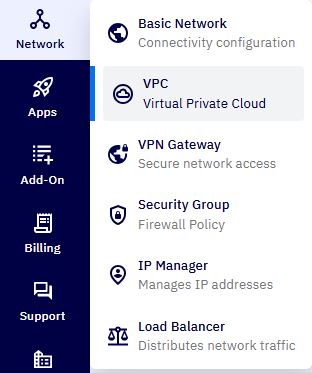
From the left navigation pane, go to:
Network → VPC
-
You will see a list of all existing VPC networks associated with your cloud account.
-
Click on the VPC name to view its details.
2. Enter VPC Configuration :
- On the VPC details page, click the Configure button.
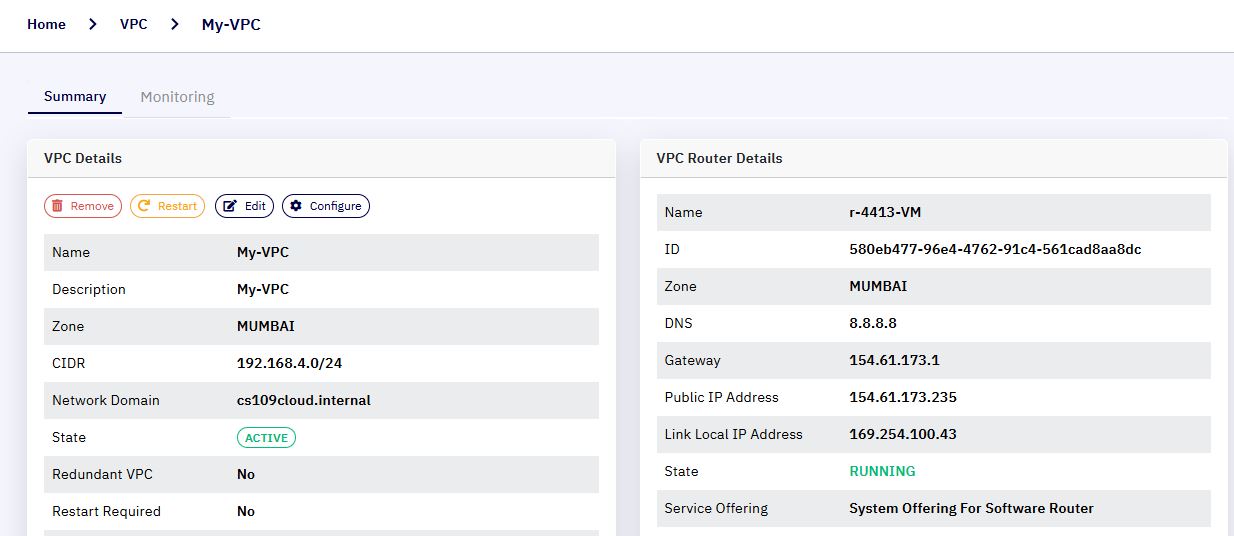
- This action will take you to the VPC Configuration Dashboard.
3. Enable the VPN Gateway :
-
In the VPC configuration page, scroll to the Router section.
-
Click on the link labeled Site-to-Site VPN Lists.
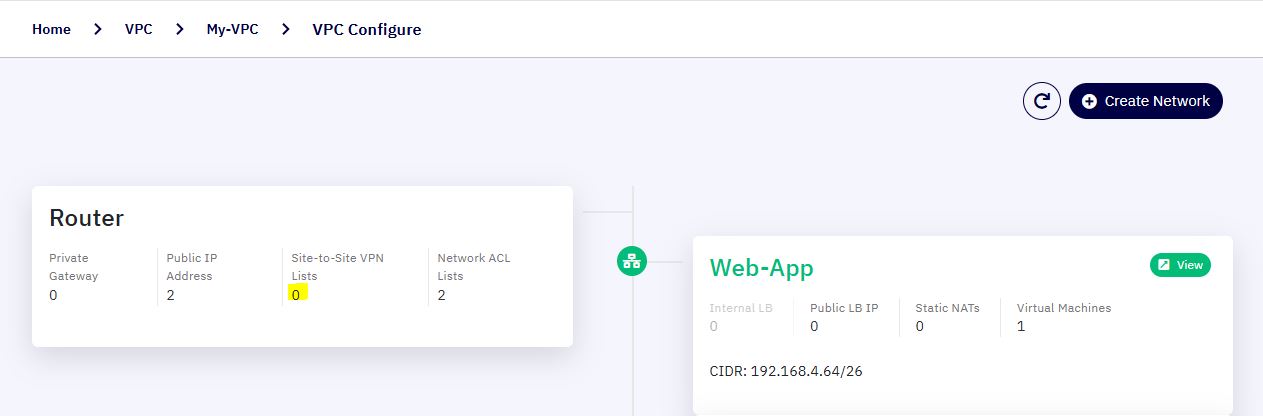
Note: If this is the first time you are enabling VPN for this VPC, a pop-up dialog will appear with the message:
"Please confirm to create S2S VPN gateway for this VPC."
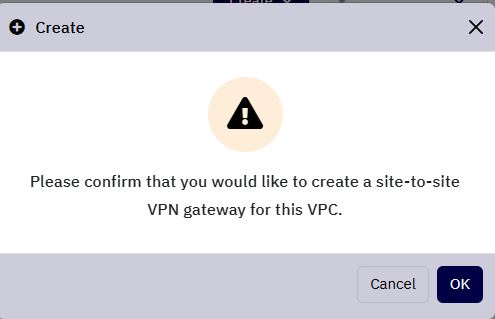
- Click OK to confirm and create the VPN Gateway.
4. VPN Gateway Creation Confirmation :
-
Once the VPN Gateway is created, you will be redirected to the VPN Gateway Configuration Page.
-
The VPN Gateway is automatically associated with the default Source NAT IP that was allocated during VPC creation.
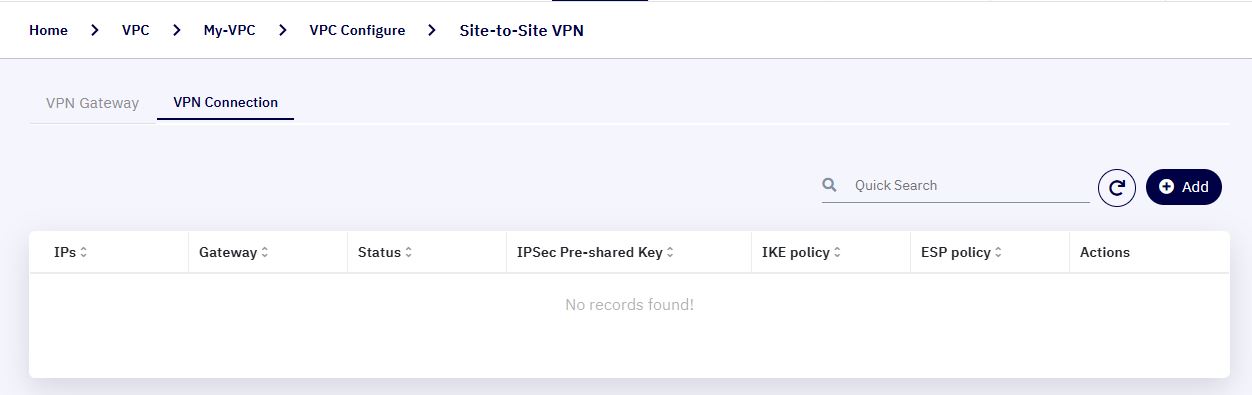
5. Add a New VPN Connection :
-
Navigate to the VPN Connection tab within the VPN Gateway configuration page.
-
Click on the Add button to start configuring a new connection.
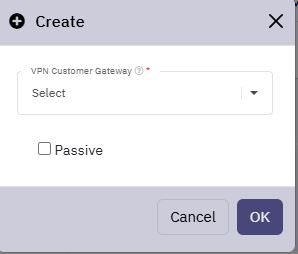
6. Select a Customer Gateway :
-
A pop-up window will appear prompting you to select a Customer Gateway.
-
Use the drop-down list to select the appropriate Customer Gateway that matches your external VPN device settings.
-
Click OK to initiate the VPN connection setup.
7. Post-Configuration :
-
Once the VPN connection is established, the tunnel status will be reflected in the VPN Connection tab.
-
Status indicators (e.g., Connected, Disconnected) help you monitor the health of the connection.
-
The tunnel is ready for secure traffic exchange between your cloud VPC and the specified remote network.