Maintenance Event
The Maintenance Event section in the Cloud Management Portal allows users to view all scheduled maintenance activities, both past and upcoming. This transparency ensures that users are informed in advance about infrastructure or platform changes that may affect their services, such as system upgrades or planned downtimes.
This section walks you through the process of accessing and filtering maintenance events in the portal.
Accessing the Maintenance Events Page
To view maintenance schedules:
-
Log in to your Cloud Management Portal.
-
Navigate to the top-right corner of the interface and click on your Profile Icon.
-
A dropdown menu will appear—click on Maintenance Event from the list.
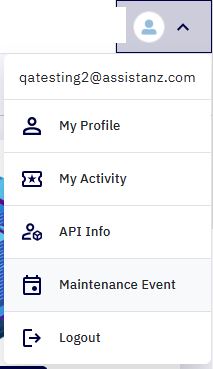
- You will be redirected to the Maintenance Events page.
Viewing Maintenance Event History
The Maintenance Events page provides a chronological listing of:
-
Past Maintenance – Completed infrastructure or portal maintenance events.
-
Upcoming Maintenance – Scheduled upgrades or updates planned for future dates.
Each event entry typically includes:
-
Title or Event Type
-
Scheduled Date and Time
-
Description or Purpose
-
Status (Upcoming / Completed)
Filtering Maintenance Events
To refine your view, a category filter dropdown is available on the top-right corner of the Maintenance Events screen. You can use this to filter events by type:
Available Filter Categories:
-
CloudStack Upgrade
Displays maintenance windows involving backend CloudStack version upgrades, service enhancements, or security patches.
-
Portal Upgrade
Shows scheduled upgrades or UI changes specific to the Cloud Management Portal, such as new feature rollouts or interface improvements.
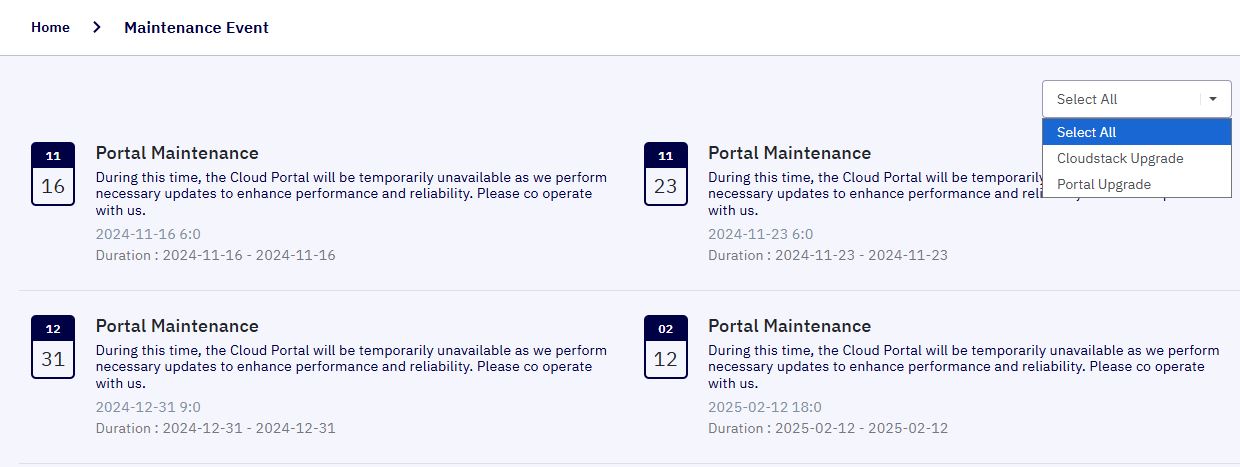
Note: Select the appropriate category to quickly identify relevant events based on your role (e.g., developers may focus on CloudStack upgrades, while end users may prefer to view Portal-related updates).